Scaling (Kubernetes)
Ocean's pod-driven scaling for Kubernetes clusters serves three main goals:
- Schedule pods that failed to run on the current nodes due to insufficient resources.
- Ensure frequent scaling pods don't wait for instances to launch (see Headroom section for more details).
- Ensure cluster resources are optimally utilized.
Spot Ocean vs. Metric-Based Node Autoscaling
Ocean ensures that all pods in the cluster have a place and capacity to run, regardless of the current cluster's load. Moreover, it ensures that there are no underutilized nodes in the cluster. Metric-based cluster autoscalers are not aware of pods when scaling up and down. As a result, they may add a node that will not have any pods or remove a node with some system-critical pods on it, like kube-dns. Usage of these autoscalers with Kubernetes is discouraged.
Scale Up
Ocean continuously checks for unschedulable pods. A pod is unschedulable when the Kubernetes scheduler cannot find a node that can accommodate the pod. This can happen due to insufficient CPU, Memory, GPU, or custom resource, for example, when a pod requests more CPU than what is available on any of the cluster nodes. In addition, the Ocean autoscaler supports the Extended Resources feature, as described below.
Unschedulable pods are recognized by their PodCondition. Whenever a Kubernetes scheduler fails to find a place to run a pod, it sets the schedulable PodCondition to false and the reason to unschedulable.
Ocean calculates and aggregates the number of unschedulable pods waiting to be placed and finds the optimal nodes for the pod. Ocean ensures that all the pods will have enough resources to be placed. It also distributes the Pods on the most efficient number of VMs from the desired cloud provider. In some scenarios, it will distribute certain machine types and sizes based on the pod requirements and the spot/preemptible VM prices in the relevant region.
It may take a few moments before the created nodes join the Kubernetes cluster. To minimize this time (to zero), learn more about cluster Headroom.

Affinity and Anti-affinity
You may want to have multiple replicas of a pod running in the cluster, but ensure that each pod does not run on the same node as other replicas of itself. To distribute the replicas properly, you can set an anti-affinity across availability zones. The autoscaler will then automatically launch instances satisfying the pod requirements.
Example: Anti-affinity across availability zones:
spec:
  replicas: 3
  affinity:
    podAntiAffinity:
      requiredDuringSchedulingIgnoredDuringExecution:
      - labelSelector:
          matchExpressions:
          - key: mykey
            operator: In
            values:
            - antiaffinity
        topologyKey: failure-domain.beta.kubernetes.io/zone
In the affinity syntax, Ocean supports both matchExpressions and matchLabels.
Scale Up According to Available IPs
Cloud service provider relevance: AWS Kubernetes
When the Ocean autoscaler needs to scale up an instance, it selects the availability zone and the included subnet with the most available IPv4 addresses. This avoids IP address exhaustion in a specific subnet and prevents scaling up a node in a subnet that does not have enough IP addresses.
If all the subnets for a virtual node group run out of available IP addresses, scaling up is blocked, and the Spot Monitoring Team will email you to request that you add more subnets to the virtual node group.
Support for Shielded GKE Nodes
Cloud service provider relevance: GKE
Shielded GKE Nodes is a security feature intended to prevent attacks based on impersonating a node in the cluster. GKE achieves this by requiring a certification procedure before allowing a new node to register to the cluster.
To enable the import of GKE clusters to Ocean and registration of new nodes in the cluster, the Ocean Controller will function as the approver of the signing requests instead of the GKE mechanism. This allows the Kubernetes mechanism to sign the request and let the node be registered to the cluster. The result is that Ocean can seamlessly scale up nodes in your Ocean-managed GKE cluster, and the nodes will benefit from the protection provided by the Shielded GKE Nodes feature.
Kubernetes namespaceSelector Scaling Constraint Label
Ocean Controller Version 2 supports the namespaceSelector scaling constraint label introduced in Kubernetes Version 1,24. When you apply this label, Ocean's autoscaler scales up nodes based on the Namespace selector to schedule pods. See Kubernetes documentation.
Maximum Pods Custom Configuration
Cloud service provider relevance: AWS Kubernetes
AWS Kubernetes clusters use reserved elastic network interfaces (ENI) to enhance network stability and predictability. In Ocean, you can use the reservedENIs attribute to specify the number of ENIs to reserve per instance (for cluster / virtual node group) for scaling purposes. Ocean includes reserved ENIs when calculating how many pods can be scheduled on a node.
The Ocean autoscaler can only spin up instances with enough free IP addresses after considering the reservedENI parameter.
Reserved ENI behavior is as follows:
- When
reservedENIs = 0: Default autoscaling behavior. - When
reservedENIs = Integer: Ocean autoscaler calculates how many pods can be scheduled on a node, considering this attribute.
Make sure that the attribute value is not too large, effectively blocking the usage of some instance types. Select instance families with sufficient ENIs for your pod density.
When configuring reservedENIs for an Ocean cluster virtual node group, if you set a custom maximum number of pods using the maxPods attribute in the user data, ensure it aligns with the reservedENIs attribute. The reservedENIs attribute determines the maximum number of pods per instance based on available ENIs, so any discrepancy between these settings may lead to scheduling issues or suboptimal resources.
Use the Spot API to set a custom value for autoscaling to include reservedENIs:
Resource Reservation for System Components that Manage Nodes
Cloud service provider relevance: GKE
Ocean now supports node health optimization in your GKE clusters by ensuring resource reservations for system components that manage nodes, such as the Kubelet and Kube-Proxy. Ocean considers these components when calculating the resources that nodes require. Without resource reservations, nodes can become unhealthy even if they are not considered as such in the GKE platform, for example, due to a lack of resources when pods are assigned and run on the node. Resource reservations are available at both cluster and virtual node group levels.
To enable this feature for Ocean GKE, contact the Spot Support team.
Ocean Instance Recovery Mechanism
Cloud service provider relevance: AWS Kubernetes
The Ocean node recovery process occurs when a spot instance in a cluster experiences an interruption and needs to be gracefully drained and replaced with a new instance. This process considers scaling constraints, such as labels, availability zones, pod requests, and daemon sets. Ocean's autoscaler ensures accurate scale-up by only launching new nodes when required to avoid wasting idle resources. Ocean checks where the pod can run and estimates whether a new node is required even before the pod enters the pending state.
Scale Down
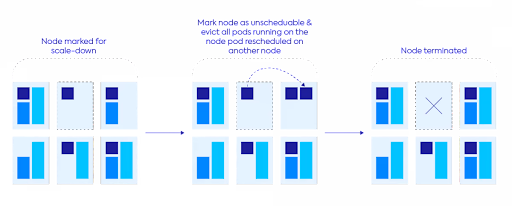
Ocean proactively identifies underutilized nodes and bin-packs their pods more efficiently to scale down the nodes and reduce cluster cost. A higher resource allocation reflects this. Once a minute, Ocean simulates whether there are any running pods that can be moved to other nodes within the cluster. If so, Ocean drains those nodes (cordons the nodes and evicts the pods gracefully) to ensure continuous infrastructure optimization and increased cloud savings.
Scale Down Behavior
-
When Ocean identifies a node for scale down, it uses a configurable draining timeout period of at least 300 seconds. You can edit the
drainingTimeoutvalue at Ocean level. Ocean marks the node as unschedulable and evicts all pods running on it.-
Ocean spreads out the evictions instead of deleting the pods simultaneously. All the pods that run on the nodes are evicted over a period of 120 seconds. For example, if 10 pods run on the nodes, one pod is evicted every 12 seconds.
-
When all the pods have been successfully evicted from the node, the node is drained (scaled down) immediately without waiting for the draining timeout period to expire.
-
If the eviction fails, Ocean has a retry mechanism that tries to evict the pods a few seconds later. If eviction fails after one minute, Ocean forces the pod to be deleted.
-
-
If there are still pods that cannot be evicted from the node when the draining timeout period expires, the node is terminated, and the pods are removed.
-
By default, Ocean scales down a node only if it can remove the pods without violating any Pod Disruption Budget (PDB). However, you could decide to ignore the PDB restriction during scale down. Contact the Spot Support team if you want to ignore the restriction. When PDB restrictions are ignored, Ocean still drains the node using the staggered eviction process (described above), which helps minimize PDB violations even though they are not strictly enforced.
-
The
maxScaleDownPercentageparameter at cluster level indicates the percentage of the cluster nodes that can be scaled down at once. If you want to scale down the cluster as quickly as possible, you can increase this parameter value to accelerate the scale down.
Scale Down Prevention
Some workloads cannot tolerate being interrupted or moved to different nodes. You can prevent Ocean from scaling down nodes running these workloads while still benefiting from spot instance pricing. Examples include jobs or batch processes that must complete without interruption.
To prevent Ocean from scaling down a node, apply one of the following labels to the pods running on that node:
- spotinst.io/restrict-scale-down:true label – This label is a proprietary Spot label (additional Spot labels). When a pod has this label, Ocean will not scale down the node running that pod.
- cluster-autoscaler.kubernetes.io/safe-to-evict: false annotation – This is a standard Kubernetes cluster autoscaler annotation that works the same way as the restrict-scale-down label. If you are migrating from the standard Kubernetes cluster autoscaler to Ocean, you can keep using this annotation without changing your pod configurations.
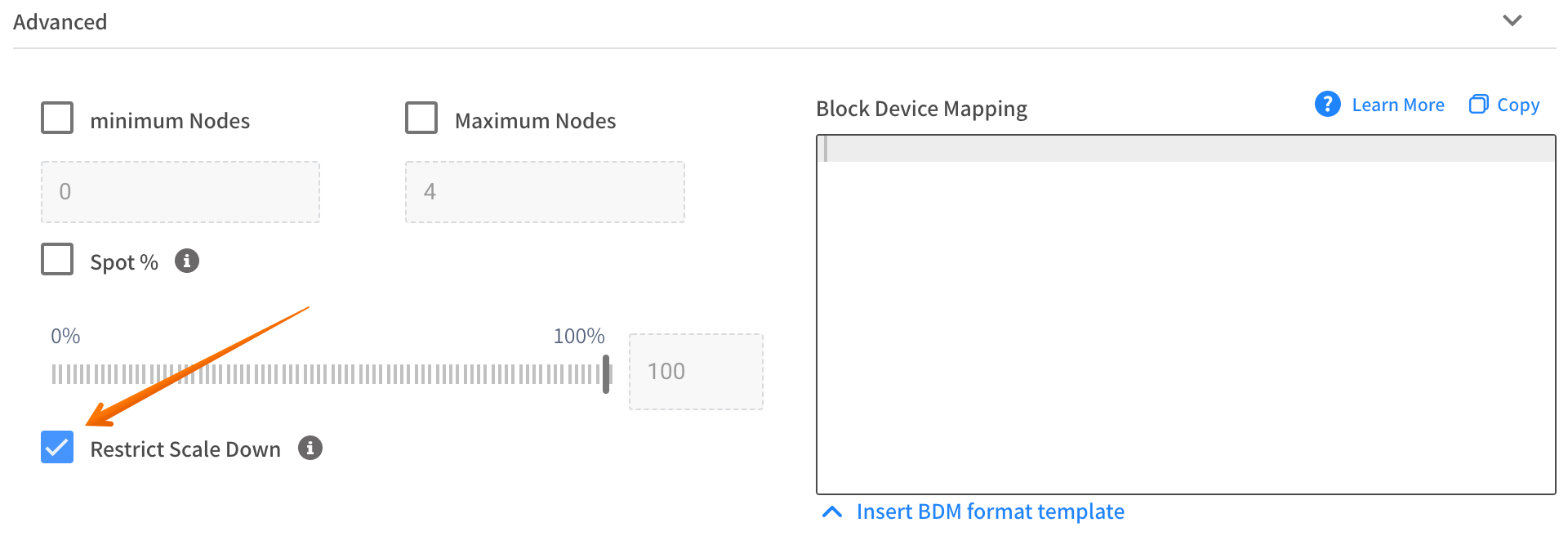
You can also prevent node scale down from a specific virtual node group:
-
Through the Spot UI console.
-
Through the Spot API: Using the API, you can set the
restrictScaleDownparameter toTrue. Once enabled, virtual node group nodes are treated as if all pods running have therestrict-scale-downlabel. Ocean will not scale nodes down from the virtual node group unless they are empty.
Accelerated Scale Down
Cloud service provider relevance: GKE and EKS
Accelerated scale-down is an Ocean autoscaler feature that enhances efficiency and cost-effectiveness in your Kubernetes clusters. It monitors your Ocean cluster for underutilized nodes and terminates unnecessary ones, so you do not pay for idle resources.
Kubernetes dynamically scales resources based on demand. However, as workloads decrease, you may find your cluster with an excess of underutilized nodes. These idle resources incur unnecessary costs.
Accelerated scale-down significantly reduces the time regular scale-down processes take to scale down nodes. Once a node is identified as eligible for scale down, it is immediately scaled down by the Ocean autoscaler, depending on a scale-down percentage parameter, maxScaleDownPercentage.
maxScaleDownPercentage is the percentage of the cluster nodes that can be simultaneously scaled down. You can set the maximum scale-down percentage from 1-100, 100% for maximum acceleration.
For EKS only, you can set accelerated scale-down for specific virtual node groups in your cluster.
Use accelerated scale-down for:
-
Prioritizing cost optimization: Scale down resources in larger or more complex environments that do not require continuous operation, such as development and testing.
-
Batch processing for short runs: Scale down remaining underutilized nodes after jobs with short run duration (such as every hour for 10-15 minutes) end.
-
Workload Balancing in CI / CD pipelines: For pipelines with workloads that are resource-intensive during specific stages and less demanding during others, scale down resources during the lighter stages.
-
Handling sudden drops in demand: Scale down resources when traffic decreases.
Use accelerated scale-down for specific virtual node groups in a cluster to exploit these additional advantages:
-
Fine-Grained Control for diverse workloads: Selectively enable accelerated scale-down for specific workload profiles (e.g., CI/CD pipelines, batch jobs) while keeping conservative scaling for production-critical workloads.
-
Optimize cost management: Ensure that you only apply accelerated policies where cost savings outweigh potential risks.
-
Reduce operational risk: By scoping accelerated behavior to virtual node groups, you minimize the chance of impacting workloads that need stability, while still accelerating scale-down for ephemeral or stateless workloads.
-
Autoscaler alignment: autoscaler can respect workload-specific taints, tolerations, and affinity rules. This avoids cluster-wide overrides that might conflict with scheduling policies.
To set accelerated scale-down for the cluster (EKS and GKE):
-
In the Spot API Create Cluster/Update Cluster, set
cluster.autoscaler.down.aggressiveScaleDown.isEnabled = true. -
Optionally increase scale-down further by increasing the
maxScaleDownPercentagevalue up to 100%.
To set accelerated scale-down for a virtual node group (EKS only):
The virtual node group setting has the highest priority, and will override the cluster setting.
-
In the Spot API Create virtual node group/Update virtual node group, set
launchSpec.autoScale.down.aggressiveScaleDown.isEnabled = true -
Optionally increase scale-down further by increasing the
maxScaleDownPercentagevalue up to 100%.
Draining Timeout per Virtual Node Group
Cloud service provider relevance: AWS Kubernetes
The draining timeout (drainingTimeout) is the time period that Ocean waits for the draining process to complete before terminating an instance. The default is 300 seconds.
Setting the draining timeout at the virtual node group level (rather than the cluster level) lets you:
- Minimize infrastructure costs by efficiently terminating nodes that are no longer needed,
- Customize Virtual Node Groups based on the time it takes to terminate a workload.
You can set the draining timeout (under strategy) via the Spot API or via Terraform.
Suspension Hours
Cloud service provider relevance: AKS
You can set a suspension hour (suspensionHours) time frame for critical periods to exempt your cluster from Ocean's scaling-down activities and ensure uninterrupted operations.
During suspension hours, Ocean autoscaler stops scaling down nodes for Ocean-initiated actions, such as bin packing, reverting to lower-cost nodes, or reverting to reserved nodes.
You can only set the suspension hours through the Spot API (under Update Cluster).
- To enable suspension hours, set
isEnabledtoTRUE - To set the time frame, edit start and end times in
timeWindows.
Pre-Eviction Warmup
Cloud service provider relevance: EKS, AKS, GKE
Prerequisite: Ocean controller: v2.1.0 or above.
When a node is drained and pods are evicted by the Ocean controller, the availability of the application might be affected, especially for single-replica applications. This happens because the pod is evicted first, causing it to stop receiving traffic, and only then a new pod is created by the ReplicaSet controller.
Click to view image...
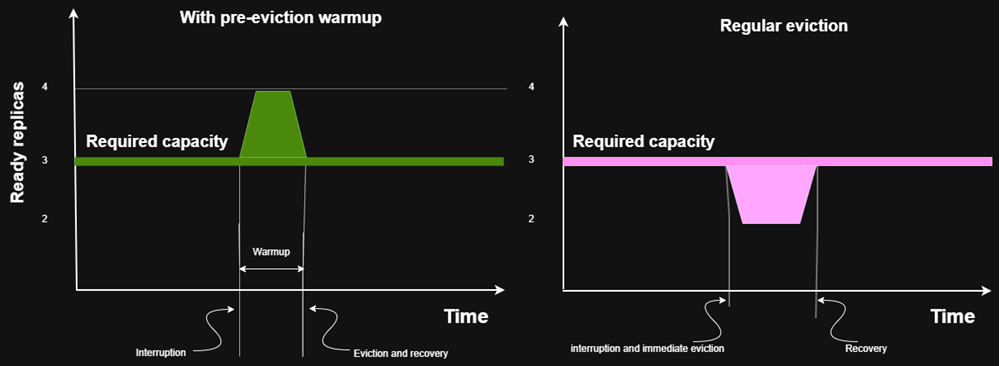
You can set a pre-eviction warmup period to change this behavior for specific pods. During this period, Ocean:
- Creates a replacement pod.
- Waits for the configured warmup duration.
- Only then evicts the original pod.
This ensures that new pods are ready to handle requests before old pods are removed, reducing downtime and improving application availability.
Pre-eviction warmup provides these benefits:
- Minimizes downtime during scaling or interruptions.
- Ensures smooth traffic shift without service disruption.
- Higher availability: No sudden gaps in capacity.
To enable pre-eviction warm up on your deployment:
Add the spot.io/pre-eviction-warmup label with a value for your Deployment resource, under spec.template.metadata.labels.
Make sure you set the label on the pod labels and not on the deployment itself.
The value of the label determines the maximum duration that the Ocean controller will wait between the creation of the "warmup replacement pod" and the eviction of the original pod. If there is not enough time to include the set warmup duration, the controller will evict the original pod 5 seconds before the eviction deadline decided by the platform.
Here is a sample of the implementation:
apiVersion: apps/v1
kind: Deployment
metadata:
  name: my-app
  namespace: default
spec:
  replicas: 3
  selector:
    matchLabels:
      app: my-app
  template:
    metadata:
      labels:
        app: my-app
        # add this field.
        spot.io/pre-eviction-warmup: "300s"
    spec:
      containers:
        - name: my-app-container
          image: my-app:latest
          ports:
            - containerPort: 8080
          readinessProbe:
            httpGet:
              path: /health
              port: 8080
            initialDelaySeconds: 10
            periodSeconds: 5
Headroom
One of Ocean’s key features for optimizing scaling is headroom, a buffer of spare capacity ensuring that a cluster is always ready for a rapid application scale up. When you configure headroom in specific amounts of resources (i.e., vCPU, memory, and GPU), or specify headroom as a percentage of the cluster’s total requested resources, the cluster can scale workloads without waiting for new instances to be provisioned.
In addition to the benefits of using headroom, it is important to know how headroom could affect scaling. The compute resources saved as headroom restrict the scale-down of a node, as if those were actual containers running, to keep the amount of headroom required. In addition, if there is missing headroom, a scale-up will be triggered to ensure that headroom is maintained.
Pod Topology Spread Constraints
Ocean supports Kubernetes pod topology spread constraints. This allows for the control of how pods are spread across worker nodes among failure-domains such as regions, zones, nodes, and other user-defined topology domains in order to achieve high availability and efficient resource utilization.
Ocean automatically launches nodes while making sure that the maxSkew is maintained. Similarly, Ocean will only scale down a node if maxSkew is maintained.
When pods contain spread constraints, Ocean knows their labels and can provision nodes from all relevant topologies. Before the initial apply action of these pods, Ocean must have at least one node from each topology so that Kubernetes is aware of their existence. A single node from each topology can be configured under headroom, or by setting minimum nodes per virtual node group.
Prerequisites to support pod topology spread constraints:
- Kubernetes version 1.19 or later. For other versions, see the note in the Kubernetes documentation.
- Ocean Controller version 1.0.78 or later.
Spread by Node-lifecycle Key
When you use the spotinst.io/node-lifecycle topology key, you need a running node in each topology before applying the workloads that contain the spread constraints.
If one of the topologies running in the cluster is unavailable, the pods that should run on this topology will remain pending.
Example: When using the spotinst.io/node-lifecycle topology key in a cluster with both spot and on-demand nodes, pods may remain pending if spot capacity is unavailable. Because of the topology constraint, Kubernetes will not schedule these pods on an on-demand node, and consequently Ocean will not launch one.
Support for Extended Resources Feature
Cloud service provider relevance: AWS
The Kubernetes extended resources feature lets cluster administrators advertise custom node-level resources (such as specialized hardware or third-party devices) that Kubernetes does not natively recognize. Ocean's autoscaler considers these extended resources when scaling up and down, ensuring that nodes with the required resources are provisioned and that underutilized nodes are removed. To learn more, see Set up Extended Resource Support.
Resource Limits
Ocean allows dynamic resource allocation to fit the pods' needs. By default, Ocean cluster resources are limited to 1000 CPU cores and 4000 GB memory, but you can change these values in the cluster creation and edit wizards.
Customize Scaling Configuration
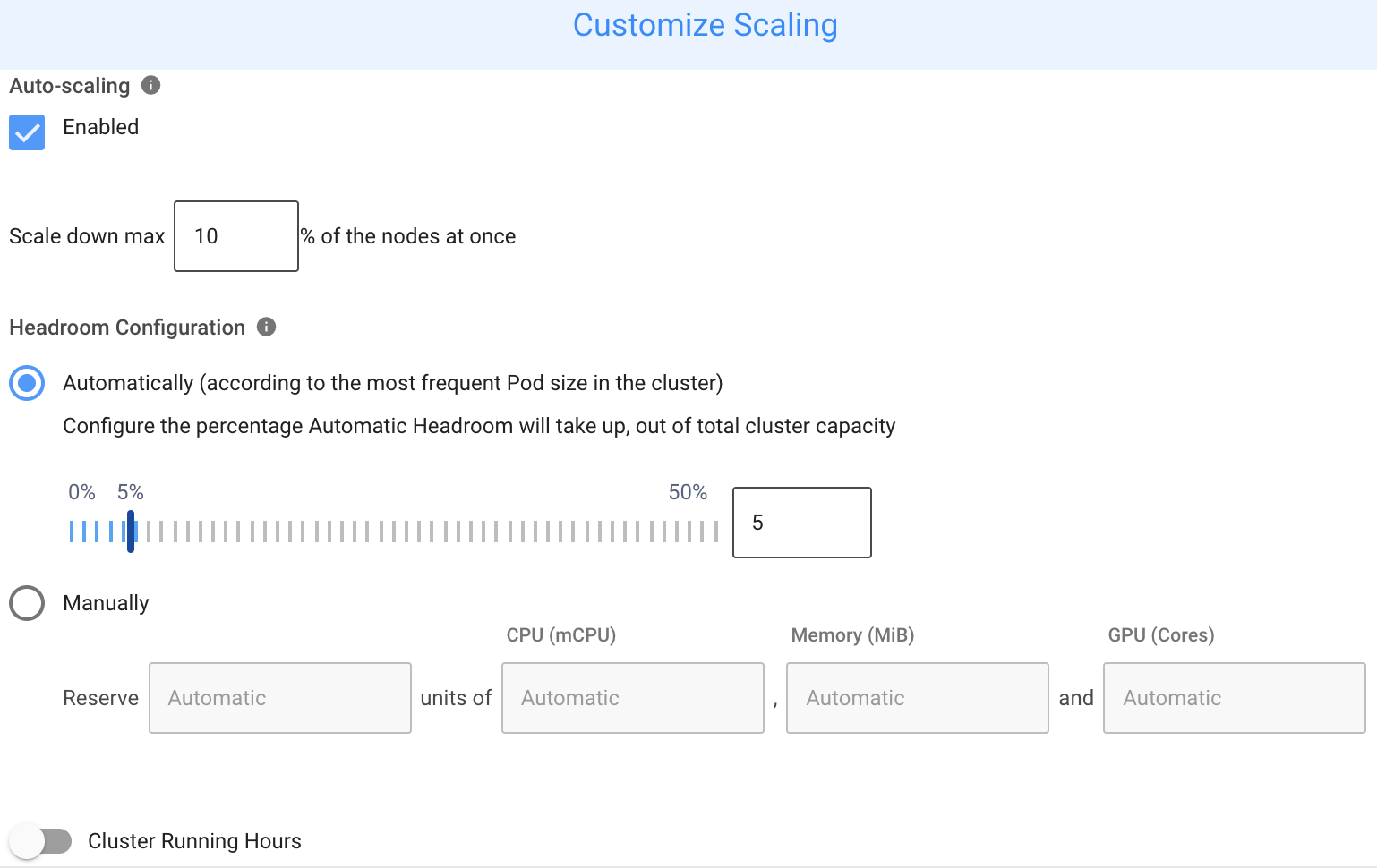
Ocean manages the cluster capacity to ensure all pods are running and resources are utilized. If you want to override the default configuration, you can customize the scaling configuration. To customize the scaling configuration:
-
Navigate to your Ocean cluster.
-
Click Actions > Customize Scaling at the top-right of the screen.
 caution
Keep Auto-scaling enabled for normal operation. Turning off Auto-scaling prevents Ocean from scaling up or down, maintaining headroom, or properly restoring the cluster after Cluster Shutdown Hours.
Supported Operating Systems
Ocean supports launching instances using any operating system (OS) type, including container-optimized types such as Bottlerocket, Container Optimized, and RancherOS.
Windows and Linux Instances in the same Cluster
Ocean lets you use different operating systems in a Kubernetes cluster. For example, using the virtual node group concept, you can have Ocean manage Windows nodes alongside other nodes in the cluster.
You should create a virtual node group with a Windows AMI.
For EKS, use an EKS-optimized Windows AMI. Ocean's autoscaler automatically launches Windows workloads only on nodes from dedicated virtual node groups. You only need to set a specific label if you have multiple virtual node groups and want to target a specific group.
Support for Max Pods Configuration
Cloud service provider relevance: AKS
AKS sets a default maximum number of pods per node, which you can customize.
Ocean also supports this feature to improve node utilization and bin packing. You can configure the maximum pods per node with one of these methods:
- At the cluster level, so that all nodes have a unified configuration.
- Per virtual node group, so that you can have different configurations for different workloads. If you have already configured the maximum pods per node on your AKS cluster, this configuration will be imported when the cluster is connected to Ocean.
This feature is available via API on the cluster level and the VNG level.
Support for Pod Scaling Readiness
Cloud service provider relevance: AKS
Ocean with Controller V2 supports Pod Scheduling Readiness (included in Kubernetes 1.30), which considers whether a pod is ready to be scheduled. This feature lets you reduce the churn of pods that stay in a "miss-essential-resources" state for a long time.
Pods with the SchedulingGated status are not scheduled. By specifying/removing a Pod's .spec.schedulingGates, you can control when a pod is ready to be considered for scheduling.
Use Pod Scheduling Readiness according to the Kubernetes documentation.
Dynamic IOPS
Cloud service provider relevance: AWS EKS
IOPS is a unit of measure representing input/output operations per second. Dynamic IOPS lets you scale IOPS for GP3 EBS volumes based on instance size so that large nodes will have more IOPS, whereas smaller nodes (that usually host fewer pods) will have less IOPS. This avoids the need for a universal high IOPS setting and offsets GP3's non-linear scaling behavior. Also, since IOPS pricing is according to its amount, accurately matching scaling requests to IOPS can save costs.
You can dynamically scale an EKS cluster or specific virtual node groups within the cluster using the Spot API or Terraform, under the Block Device Mapping (BDM) configuration.
The value for a specific virtual node group overrides the value for the cluster.
Spot API
Clusters:
Under compute-launchSpecification-blockDeviceMappings-ebs-dynamiciops
Virtual Node Groups:
Under launchSpec-blockDeviceMappings-ebs-dynamiciops
Terraform
Under block_device_mappings
Clusters:
Virtual Node Groups: